Professional 2D CAD that runs in your browser.
Draw plans, details and sheets with the commands you already know. Dogs ’n’ CAD is in early access: try every feature with your team, and tell us what you think.
Free 30-day trial during the early-access period. Ready in a minute, nothing to pay.

Nothing to install
Open the app on a PC, Mac or tablet and start drawing. Updates arrive while you work, and everyone in the office is on the same version.
Made for the whole office
Colleagues who start a trial with the same company e-mail join the same account, with shared projects, templates, blocks and comments.
Your hands already know it
Command line, typed coordinates, object snaps, ortho and polar tracking, DXF in and out. If you have drawn in AutoCAD, you can draw here on day one.
Drafting at the speed of typing
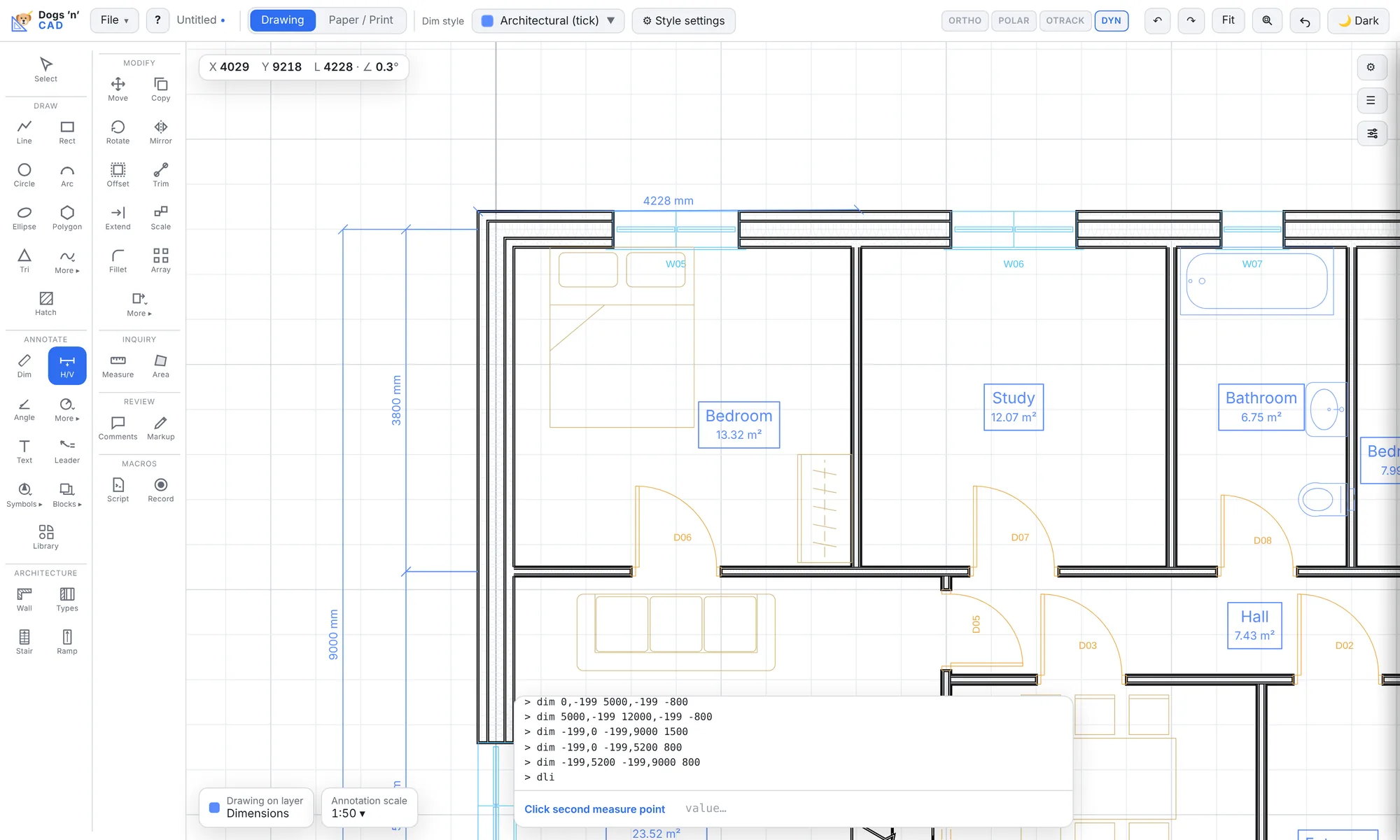
Every tool works with the mouse and with typed values. Type @5000,0 or 3000<45, snap to ends, midpoints and intersections, and let tracking line things up for you.
- Lines, polylines with arcs, circles, ellipses, splines, hatches and revision clouds
- Move, copy, rotate, mirror, offset, trim, extend, fillet, chamfer, arrays and stretch
- Associative dimensions, multileaders, text styles and annotation scale
- Layers with states and standards, blocks with attributes and a block library
Built for buildings
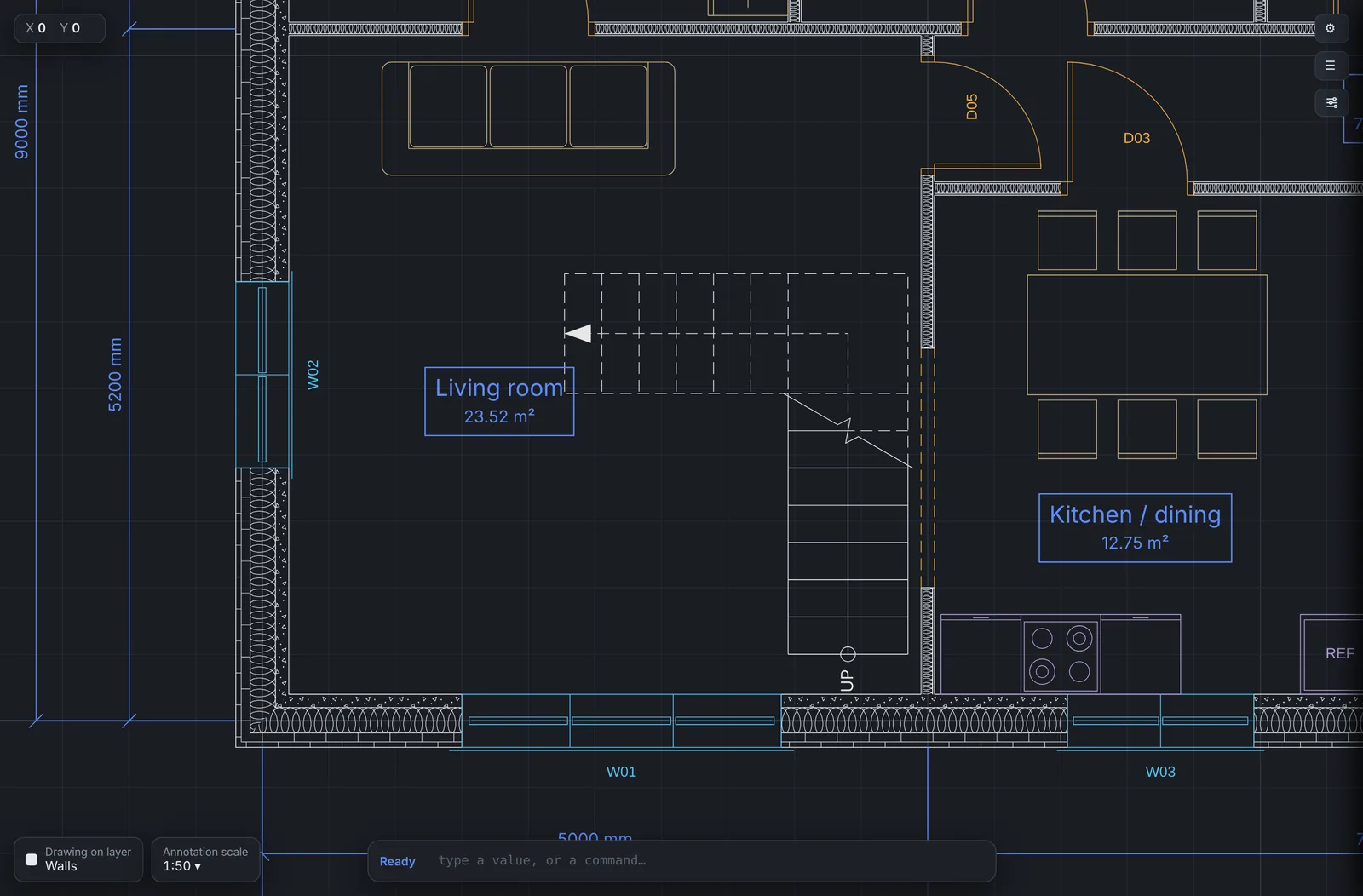
Walls, doors, windows, stairs and rooms are real objects, not loose lines. Change a wall and everything that belongs to it follows.
- Layered wall types with hatches, joined automatically at corners and tees
- Doors and windows that cut their wall, carry numbers and fill a door schedule
- Straight, L and U stairs and ramps worked out from rise and going
- Rooms with names and areas found from the walls, plus level marks
Sheets, title blocks and PDF
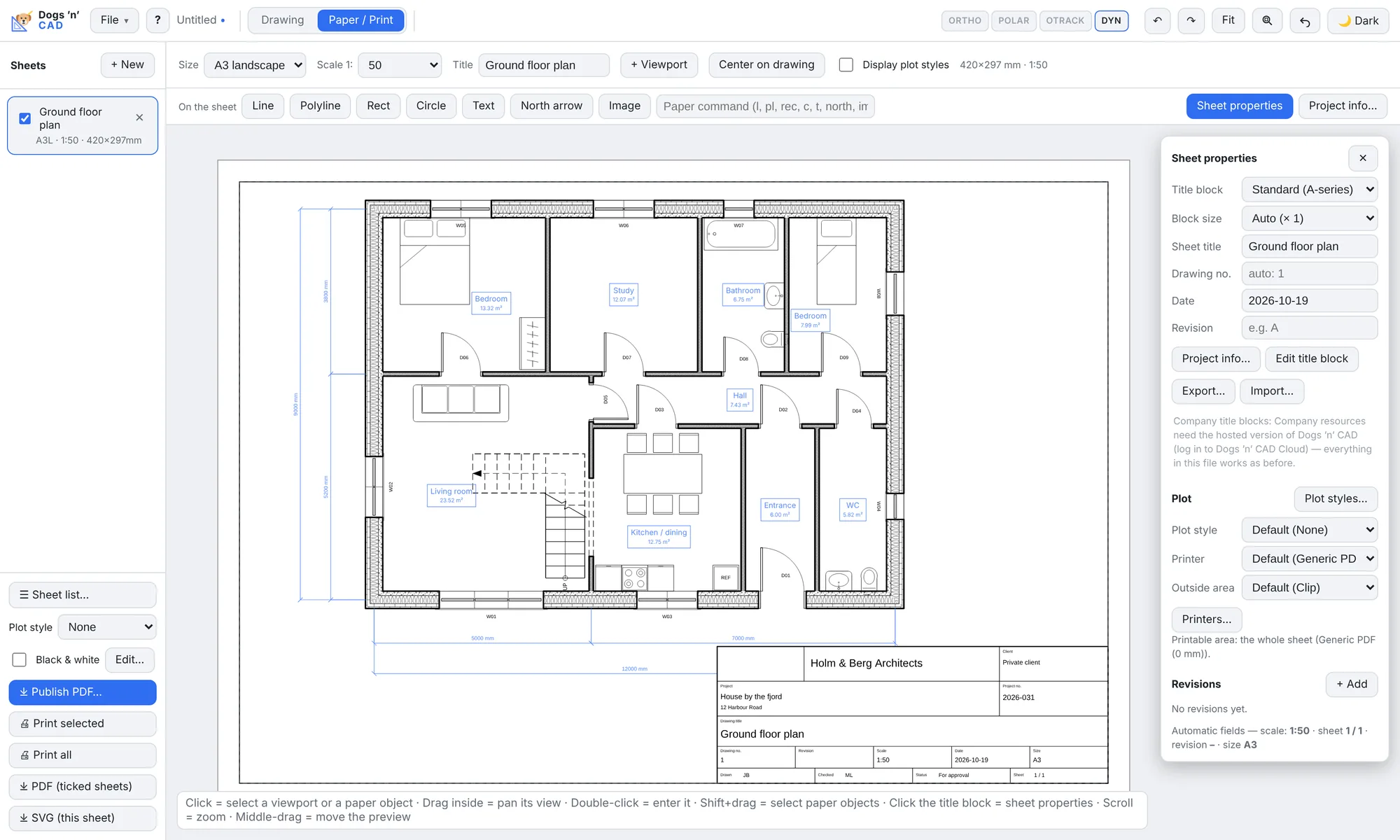
Lay out sheets with viewports at any scale and a title block that fills itself from the project information. Publish the whole set as one PDF.
- A4 to A0 sheets, several viewports per sheet at any scale
- Title blocks, including your own, with project, client, scale, date, revision and sheet number
- Plot styles, lineweights and black-and-white output
- Vector PDF and SVG, or print straight from the browser
Teamwork in the cloud
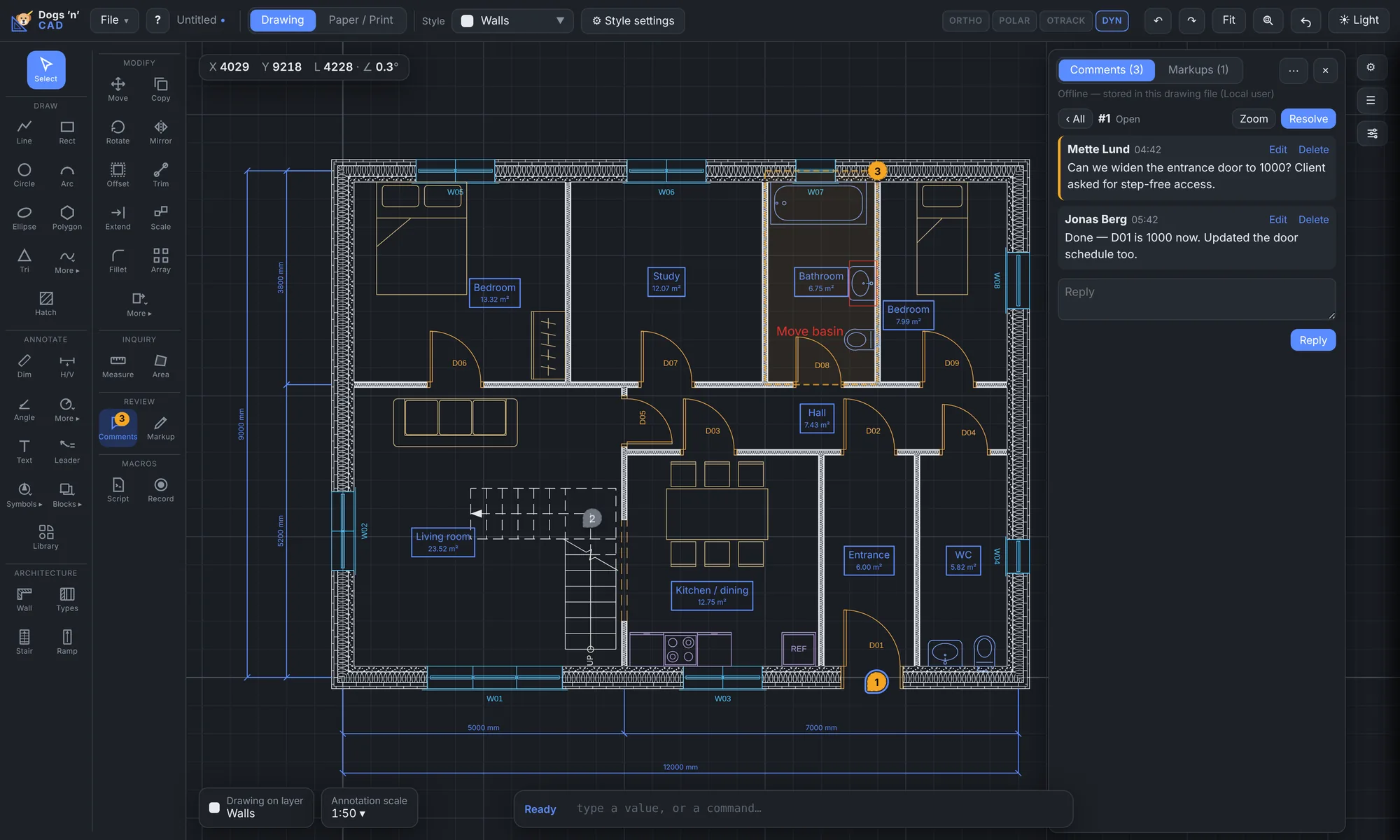
Your company gets shared projects, one set of templates and blocks, and a full history of every drawing. Nobody emails files around.
- Projects with roles, company title blocks, templates and block library
- Version history with restore, edit locks and who is looking at what
- Comments with @mentions and redline markup you accept or reject
- Live drawing together, and read-only share links for clients
Also included
- Works offline
- Install it as an app. When the connection drops you keep drawing, and changes sync when you are back online.
- Touch and pen
- Pinch to zoom, long-press for menus, and a pen with a real eraser on tablets.
- Help Center
- A page for every tool, a short tour, and F1 over any button.
- Scripts and plugins
- Record macros, write scripts, or extend the app with a JavaScript API and sandboxed plugins.
- Your data stays yours
- Export DXF, PDF and SVG at any time. Export or delete your account data whenever you like.
- Compare drawings
- See what changed between two versions, and cloud the changes for the next revision.
Switching from AutoCAD?
The commands have the names you know. Type them in the command line, press Enter to repeat the last one, and give points as x,y, @dx,dy or @length<angle.
Drawings travel both ways as DXF. Import reads DXF R12 to 2018 with layers, blocks and attributes, hatches, text and dimensions. Export writes AutoCAD 2000 DXF that opens in AutoCAD, BricsCAD and other CAD programs. Walls go out as clean polylines per wall type.
DWG files: save them as DXF in your current program first.
| Task | AutoCAD | Dogs ’n’ CAD |
|---|---|---|
| Line | LINE L | LINE L |
| Rectangle | RECTANG REC | RECTANGLE REC |
| Circle | CIRCLE C | CIRCLE C |
| Move | MOVE M | MOVE, or the M key |
| Copy | COPY CO | COPY, or Shift+C |
| Offset | OFFSET O | OFFSET, or the F key |
| Trim | TRIM TR | TRIM, or Shift+T |
| Extend | EXTEND EX | EXTEND, or the E key |
| Fillet, chamfer | FILLET CHA | FILLET CHA |
| Stretch, break, join | STR BR J | STR BR J |
| Explode | EXPLODE X | EXPLODE XP |
| Hatch | HATCH H | HATCH H |
| Linear dimension | DLI DCO DBA | DLI DCO DBA |
| Block, insert | B I | B I |
| Match properties | MA | MA |
| Ortho, polar | F8 F10 | F8 F10 |
| Object snap tracking | F11 | F6 |
Questions
What is a floating license?
A license is not tied to a person or a computer. It is taken when someone opens the app and given back when they close it (or about 30 seconds after the connection is lost). With 5 licenses, any 5 of your colleagues can work at the same time, whoever they are.
How does the free trial work?
Fill in the trial form with your work e-mail. You get a confirmation link, and after you choose a password you are drawing. The trial lasts 30 days. Colleagues who sign up with the same company domain join the same trial, each adding one license.
What happens when the trial ends?
The app is locked, and your drawings stay saved. Dogs ’n’ CAD is in early access; commercial plans come later — join the waitlist to hear first. Nothing is ever charged.
What will it cost?
Pricing is not set yet. Tell us what you think is fair in the waitlist form — it helps us decide.
Does it work offline and on a tablet?
Yes. Install it from the browser as an app and it keeps working when the connection drops; changes to cloud drawings sync when you are back online. On a tablet you get a touch layout with pinch zoom, long-press menus and pen support.
Where is my data, and is it safe?
Drawings and accounts are stored with Cloudflare (database and file storage), served over HTTPS only. Passwords are hashed, and companies can require single sign-on. Only people in your company can open your projects, and you can export or delete your data at any time. See the privacy policy.
How compatible is DXF?
Import reads DXF R12 to 2018: lines, polylines, arcs, circles, ellipses, splines, text, dimensions, hatches, layers, and blocks with attributes. Export writes AutoCAD 2000 DXF. Dimensions are exported as plain geometry, and walls as polylines per wall type. DWG is not supported; save as DXF first.
What do I need to run it?
A current version of Chrome, Edge, Safari or Firefox on Windows, macOS, Linux, iPad or an Android tablet. A mouse with a wheel is best for drafting. There is nothing to install and no plugin.
How do I get help?
The Help Center in the app has a page for every tool, and you can write to us from the Help menu or the form below. We answer by e-mail on working days.
Start your free trial
Free during the early-access period: 30 days with every feature and one license for you. Colleagues who sign up with the same company e-mail domain join you.
Already have an account? Log in.
Like it? Join the waitlist
Dogs ’n’ CAD is in early access; commercial plans come later — join the waitlist to hear first.
Questions, ideas, something missing? Use the same form to get in touch. We read everything and answer by e-mail.
- Free trial
- 30 days with every feature during the early-access period. Start one.
- No payment
- Early access is free, and nothing is ever charged.
- Your say
- Pricing is not set yet — tell us what you think is fair.